Problem Description
Github link: https://github.com/ssuresh-teachxai/fullstack-exercise-2
Fullstack Developer Challenge: Orders Management Application
Overview
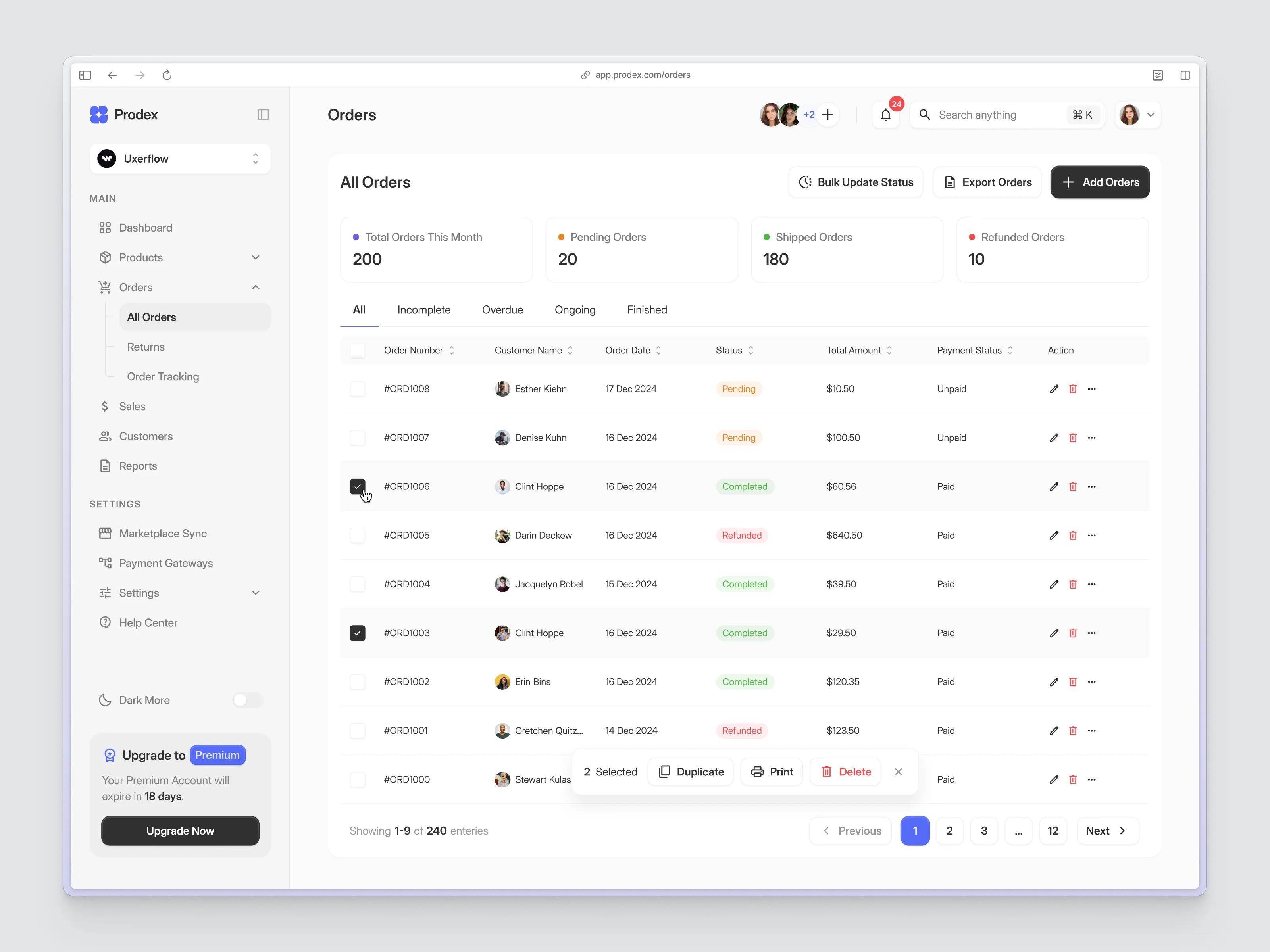
This is a timed coding exercise to evaluate your ability to build a fullstack application matching the provided design. Your task is to replicate the orders management interface shown below, with a focus on bulk operations functionality.
Time Limit
90 minutes – Prioritize core functionality (especially bulk operations) and visual accuracy.
Tech Stack
Frontend: Next.js 16+ (App Router) with Tailwind CSS
Backend: Python FastAPI
Prerequisites
Python 3.11+
Node.js 20+
Docker & Docker Compose (for containerized setup)
Setup
Quick Start with Docker Compose
The easiest way to run the entire application:
# Build and start all services
docker-compose up --build
# Run in detached mode
docker-compose up -d --build
# Stop all services
docker-compose down
This will start:
Backend API at http://localhost:8000
Frontend at http://localhost:3000
Running Manually
Frontend
cd frontend
npm install
npm run dev
Backend
cd backend
# Create virtual environment
python -m venv venv
source venv/bin/activate # On Windows: venv\Scripts\activate
# Install dependencies
pip install -r requirements.txt
# Start the server
uvicorn app.main:app --reload --host 0.0.0.0 --port 8000
Database Migrations
cd backend
# Apply all migrations
python migrate.py upgrade
# Revert all migrations
python migrate.py downgrade
# List migration status
python migrate.py list
Mock Data
Important: Candidates are responsible for seeding their own mock data. Create sample orders that match the design, including various statuses (Pending, Completed, Refunded) and payment states (Paid, Unpaid).
Required Scope
Build the following sections from implementation.jpeg:
1. Header
Logo (Prodex with orange icon)
Collapse sidebar button
"Orders" page title
User avatars with "+2" indicator
Notification bell with badge
Search bar with keyboard shortcut (⌘K)
User profile dropdown
2. Left Sidebar
Workspace selector (Uxerflow dropdown)
Main navigation: Dashboard, Products (expandable), Orders (expanded/active), Sales, Customers, Reports
Orders sub-menu: All Orders (active), Returns, Order Tracking
Settings section: Marketplace Sync, Payment Gateways, Settings, Help Center
Dark Mode toggle
Upgrade to Premium card with expiry info
3. Statistics Cards
Display four summary cards:
Total Orders This Month (blue dot indicator)
Pending Orders (yellow dot indicator)
Shipped Orders (green dot indicator)
Refunded Orders (red dot indicator)
4. Orders Table (Core Feature)
Header Actions
"Bulk Update Status" button
"Export Orders" button
"+ Add Orders" button (dark/primary)
Filter Tabs
All, Incomplete, Overdue, Ongoing, Finished
Table Columns
Checkbox (for bulk selection)
Order Number (sortable)
Customer Name with avatar (sortable)
Order Date (sortable)
Status (Pending/Completed/Refunded with color coding)
Total Amount (sortable)
Payment Status (Paid/Unpaid) (sortable)
Action (edit, delete, more options)
5. Bulk Operations (Primary Focus)
This is the core functionality to implement:
Selection
Individual row checkboxes
Select all functionality (optional)
Visual indication of selected rows
Bulk Action Bar
When items are selected, show a floating action bar with:
Selected count ("2 Selected")
Duplicate button
Print button
Delete button (red/destructive)
Close/dismiss button
6. Pagination
"Showing X-Y of Z entries" text
Previous/Next navigation
Page number buttons (1, 2, 3, ..., 12)
API Requirements
Create REST endpoints to support:
GET /orders – Fetch all orders (with filtering support)
GET /orders/{id} – Fetch single order details
POST /orders – Create a new order
PUT /orders/{id} – Update an order
DELETE /orders/{id} – Delete an order
Bulk Operations Endpoints
PUT /orders/bulk/status – Bulk update status for multiple orders
POST /orders/bulk/duplicate – Duplicate multiple orders
DELETE /orders/bulk – Bulk delete multiple orders
What NOT to Build
User authentication
Mobile/responsive layouts
Real-time updates
Actual payment processing
Settings, Analytics, or other secondary pages
Drag-and-drop functionality
Export functionality (button only, no actual export)
Print functionality (button only, no actual printing)
Evaluation Criteria
Category Weight Details
Bulk Operations 35% Selection works, bulk actions function correctly, UI updates properly
Visual Accuracy 30% Match colors, typography, spacing, shadows, borders
Code Quality 20% Clean component structure, proper API design, readable code
Layout & Structure 15% Correct use of flex/grid, semantic HTML, table implementation
Good luck!
Hints
No hints available for this question.
0 users have seen this question